

Download Mass Folder Manager Suite – Free Windows File Management Tool for Bulk Operations
Tired of manually organizing folders and files? The Mass Folder Manager Suite is a powerful, free software designed to streamline file management on Windows systems. This efficient tool allows users to perform bulk operations like creating, copying, renaming, and deleting folders with speed and precision.
Whether you're a professional managing large project directories or a home user organizing media libraries, this app delivers reliable automation without the hassle. With its intuitive interface and multiple tabs for different tasks, the software ensures you can manage your files with confidence. You can preview all changes before applying them, and if needed, use the built-in 'undo' function to reverse any action.
While it doesn’t support drag-and-drop folder addition, the navigation remains smooth and logical. The software is ideal for anyone who values time-saving automation and precise control over file organization.
Effortless Bulk File Management with Advanced Automation
One of the standout features of the Mass Folder Manager Suite is its ability to automate repetitive file management tasks. Instead of clicking through folders one by one, users can define rules and apply them across entire directories in seconds. For example, you can create hundreds of folders with sequential names, copy entire project structures with a single command, or rename multiple files based on patterns—perfect for photographers, designers, or researchers dealing with large datasets.
The software supports wildcard patterns, custom naming templates, and batch processing, making it a go-to tool for advanced users who need accuracy and efficiency. Each operation can be previewed before execution, which is a critical safety feature. This preview window clearly shows what will be created, renamed, or deleted, helping prevent accidental data loss.
Once you’re satisfied, you can proceed with confidence. The inclusion of an 'undo' feature adds another layer of security—should anything go wrong, you can revert changes instantly. This combination of automation, preview, and recovery makes the software exceptionally user-friendly, even for those who aren’t tech-savvy.
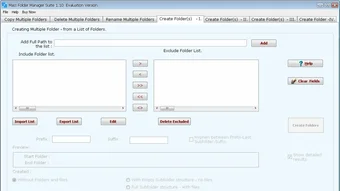
The interface is clean and logically organized, with dedicated tabs for each major function: Create, Copy, Rename, and Delete. This modular design ensures you’re never overwhelmed, and you can focus on one task at a time. Whether you're setting up a new client folder structure or reorganizing years of archived data, Mass Folder Manager Suite simplifies the process and saves hours of manual work.
Seamless Integration and User-Friendly Experience
Using the Mass Folder Manager Suite is as intuitive as it is powerful. The software is designed with a focus on usability, ensuring that both beginners and advanced users can navigate it without confusion. After launching the app, you’re greeted with a tabbed interface that separates core functions—each tab is dedicated to a specific task, such as creating folders, copying directory structures, renaming files, or deleting groups of files.
This layout eliminates clutter and enhances workflow efficiency. You can easily switch between tabs and configure settings with minimal clicks. One of the most appreciated features is the real-time preview, which displays exactly what changes will be made before you confirm them.
This is especially helpful when renaming files with complex patterns or copying large directory trees. The preview window shows the source and destination paths, along with the final file names, so you can double-check for errors. If you make a mistake, the 'undo' function allows you to roll back the last action instantly—no need to worry about irreversible deletions or misnamed files.
The software also supports saving and loading configuration profiles, so you can reuse common setups for recurring tasks. For instance, if you regularly create monthly project folders, you can save the naming pattern and folder structure as a template. The app runs smoothly on Windows 10 and 11, with minimal resource usage, ensuring it doesn’t slow down your system during long operations.
Although it lacks drag-and-drop folder addition—a minor drawback—it compensates with powerful search and path selection tools that make navigation quick and accurate.
Compatibility, Installation, and System Requirements
Mass Folder Manager Suite is specifically designed for Windows operating systems, including Windows 10 and Windows 11 (both 32-bit and 64-bit versions). It does not currently support Mac, Android, or iOS, so users on non-Windows platforms will need to look for alternative solutions. The installation process is straightforward and takes less than a minute.
Simply download the setup file from the official website, run the installer, and follow the on-screen instructions. No additional drivers or dependencies are required—everything is included in the package. Once installed, the app launches quickly and integrates seamlessly with your system.
The software is completely free to download and use, with no trial period or hidden costs. It’s ideal for students, freelancers, educators, and small business owners who need a reliable file management tool without spending money. The interface is lightweight and responsive, using minimal CPU and RAM during operation, which means it won’t interfere with other applications.
For users who prefer portable use, the app also offers a portable version that can be run directly from a USB drive—perfect for working on multiple computers without installation. The app supports all standard file systems (NTFS, FAT32, exFAT) and handles long file paths and special characters without issues. It’s also compatible with network drives and mapped folders, making it suitable for team environments.
While the lack of mobile support limits its reach, its desktop-focused design ensures deep integration and stability on Windows systems. Regular updates are released to improve performance, fix bugs, and add minor enhancements, ensuring the software remains secure and up-to-date.
Pros and Cons: A Balanced Look at Mass Folder Manager Suite
- Pros:
- Free to download and use with no hidden fees
- Powerful batch operations for creating, copying, renaming, and deleting folders
- Real-time preview before executing any action
- Undo functionality for safe, reversible changes
- Supports wildcard patterns and custom naming templates
- Lightweight and fast performance on Windows systems
- Portable version available for USB use
- Intuitive tabbed interface for easy navigation
- Cons:
- No drag-and-drop folder addition feature
- Not available for Mac, iOS, or Android users
- Limited to Windows-only platforms
- Basic user interface without advanced customization options
- No built-in cloud integration or sync features
Frequently Asked Questions (FAQ)
Is Mass Folder Manager Suite free to download?
Yes, the Mass Folder Manager Suite is completely free to download and use. There are no trial periods, subscriptions, or hidden charges. You can use all features without paying a single cent.
Can I use this software on Windows 11?
Absolutely. The software is fully compatible with Windows 11 and Windows 10, both in 32-bit and 64-bit versions. It runs smoothly without any known compatibility issues.
Does the app support undo after a batch operation?
Yes, one of the most valuable features is the 'undo' function. After performing any bulk operation, you can reverse the changes instantly, ensuring safety and peace of mind.
Can I rename files based on patterns?
Yes, the software supports advanced renaming with wildcard patterns and customizable templates. You can rename files based on date, number sequences, or custom text, making it ideal for bulk file organization.
Is there a portable version available?
Yes, the software offers a portable version that can be run directly from a USB drive without installation. This is perfect for users who work on multiple computers or prefer not to install software.
Final Verdict: A Must-Have Tool for Windows Users
If you're looking for a secure, efficient, and free file management tool for Windows, the Mass Folder Manager Suite is an excellent choice. It delivers powerful automation features without the complexity of enterprise-level software. Its ability to handle bulk operations with real-time previews and instant undo makes it both safe and reliable.
While it lacks cross-platform support and drag-and-drop functionality, its strengths far outweigh these minor limitations. Whether you're managing project folders, organizing media files, or preparing data for backups, this app saves significant time and reduces human error. The clean interface, lightweight performance, and regular updates ensure a smooth user experience.
For anyone who frequently works with folders and files on Windows, this tool is a game-changer. Download Mass Folder Manager Suite today and transform your file organization workflow.







